
Plan: Creating a promise is Pro+ (
p_plus). The product refusal is: “Payment promises are on Pro and above. You can still pause an invoice manually on your current plan.” Existing promises stay readable after a downgrade. Arrangements / Payment Plans are a separate entitlement.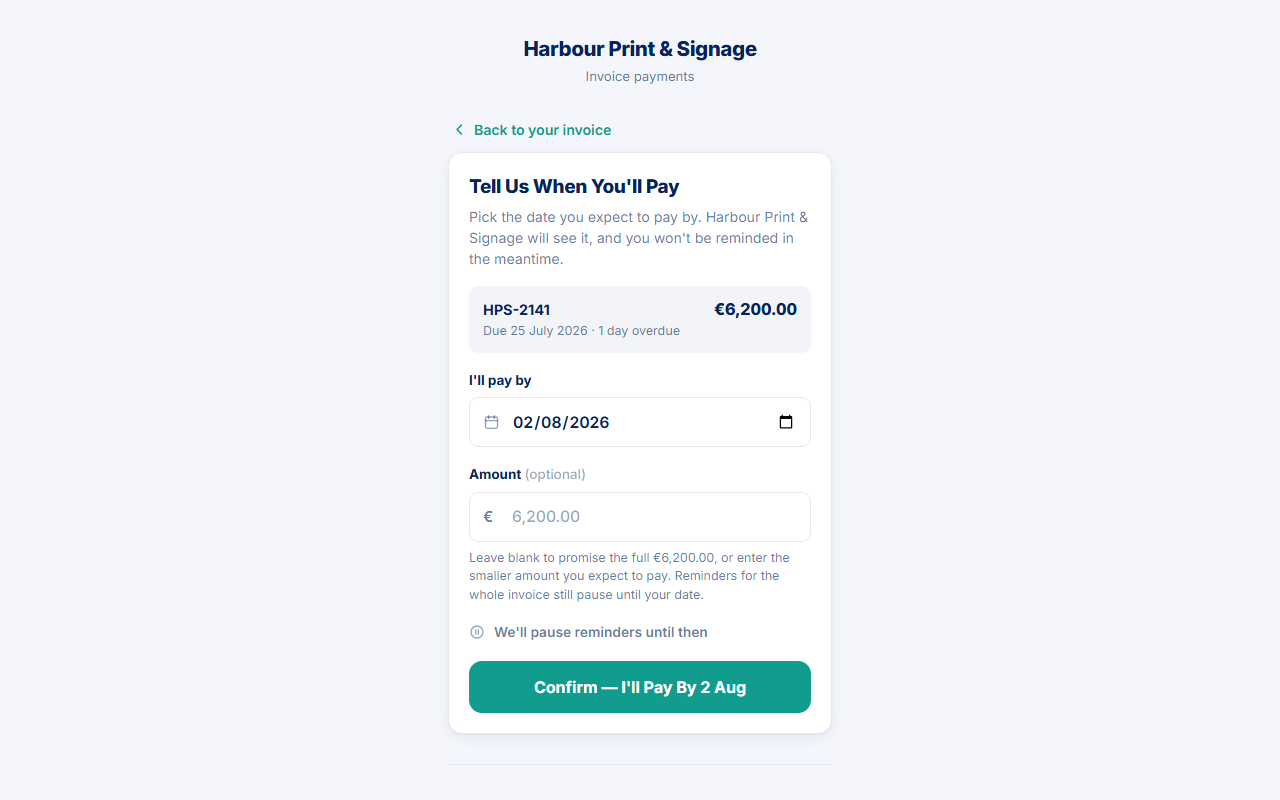
A promise turns “I'll pay next Friday” into a dated record. It is not money received and not a PayBlah subscription event.
Before you start
- Date range is today through 365 days ahead.
- A promised amount is asked only when the link (or invoice) is a single invoice.
- Below Pro, hide the portal button and use Pause chasing on the invoice instead.
Customer path (portal, Pro+)
- Open the payment link → Tell us when you'll pay.
- Set I'll pay by.
- Optional: enter Amount. Leave blank to promise the full balance. The hint says reminders for the whole invoice still pause until the date even if the amount is smaller.
- Press Confirm the date.
- If they need several dates and proposals are on, use the doorway Ask to Pay in Instalments (or View Your Plan if a plan already exists). That is not a fifth home button. Asking for a plan does not pause chasing.
Confirmation is rendered from the row that was written. Typical copy: “Thanks — noted. We'll hold reminders until {date}.” plus how much they said they would pay.
Your path (invoice)
- Open the invoice → Record a promise (or Edit promise if one is already open).
- Set Promised date, optional Amount, and a private Note.
- Press Save promise or Update promise. Open promises can be cancelled with Cancel promise.
While a promise is open
- Automated chasing on that invoice is designed to stay quiet until the date.
- Activity → Promises lists open cards (badge Open promise) with promised / received / outstanding / grace deadline, and Open invoice.
- An early payment that is recorded as money can clear the need to follow up. A portal part click is not that payment.
After the date is evaluated
Kept, partial, and broken standalone promises wait in Activity until a person presses Acknowledge or Acknowledge & resume. Resume asks “Resume normal follow-up on the remaining balance?” It does not auto-send Firm or Final wording. See When a promise is broken.
If something goes wrong
- Portal closed for create — you are below Pro. Pause the invoice manually.
- They wanted instalments — open Payment Plans or turn on Let Customers Propose a Plan (still Pro+, default off).
- Do not treat a missed date as permission to free-type court or enforcement language.