
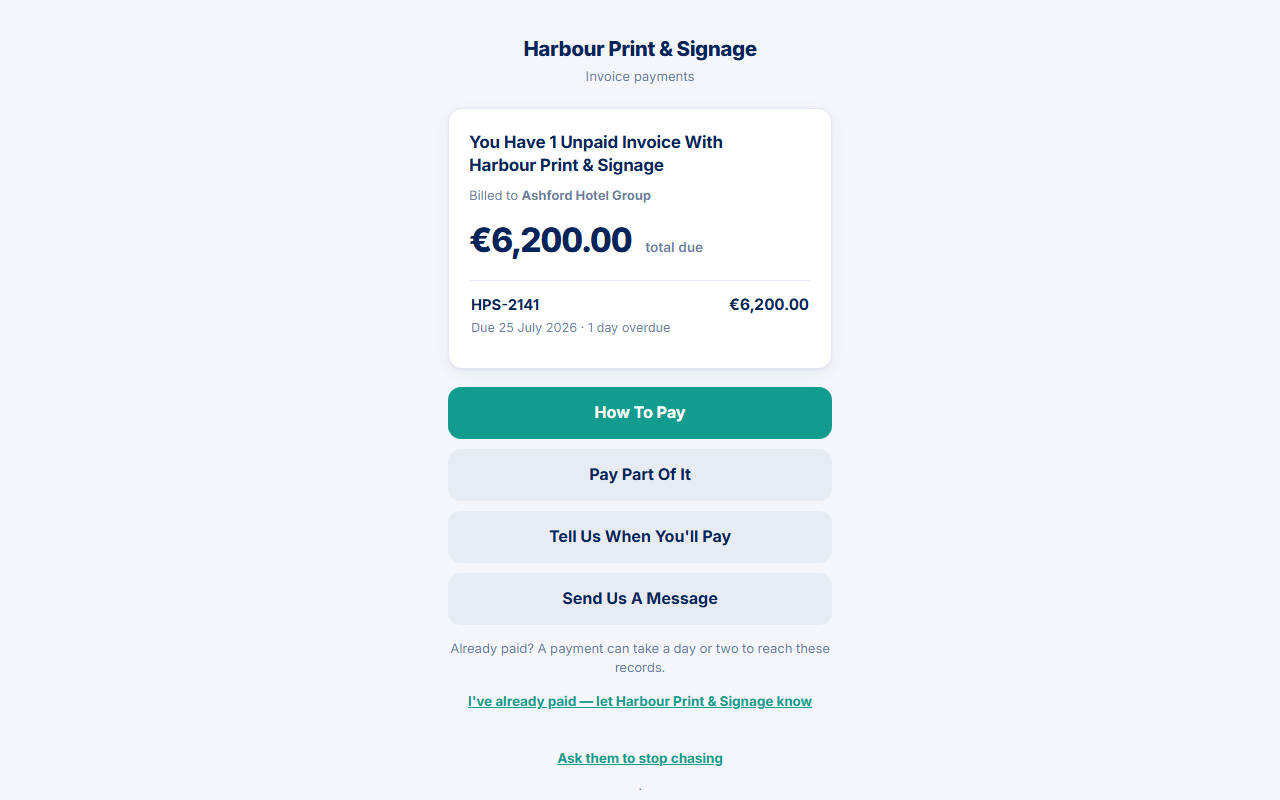
The portal is the page behind a payment link. It is written for the person who pays you. You remain the creditor. PayBlah does not speak as a collector and does not hold the money.
Before you start
- Use Preview what the customer sees on the invoice if you need to review the live page. Do not publish the token.
- If Portal Branding Plus is installed with business logo mode and a file exists, the header can show that logo plus optional heading and intro. Missing logo uses the same closed page as a bad link — it does not leak the business.
Unpaid home
- Customer opens the link. Title is You have [n] unpaid invoice(s) with {your name}, plus billed-to, each reference / due / timing / amount, and a total due.
- Primary buttons: How to pay; Pay part of it only when there is one unpaid invoice; Tell us when you'll pay when promises can be created (Pro+); always Send us a message.
- Note: “Already paid? A payment can take a day or two to reach these records.”
- Secondary links: I've already paid — let {you} know; Ask them to stop chasing; This isn't me; I dispute this.
- Footer: your address if set, powered by PayBlah, and Report a problem with this link to PayBlah.
There is no fifth home button for instalments. When proposals are allowed, Ask to Pay in Instalments / View Your Plan appear on the promise page, not on home.
Settled home
When nothing is unpaid or disputed: Nothing outstanding with {your name}, optional last-payment date, See what was received if payment rows exist, Send us a message, then Stop messages and This isn't me.
Stop messages is the same stop request as Ask them to stop chasing. It does not mute email or SMS until a person in Activity → Stop Requests presses Accept or Decline.
Disputed-only home
When every covered invoice is disputed: This account is under review with {your name}. Pay, part, and promise are hidden. The customer can still Send us a message, use Stop messages / This isn't me, and report the link to PayBlah. Mixed unpaid + disputed lists the unpaid invoices as ordinary and footnotes the disputed ones.
What they will not see
- Your internal notes, team users, dashboard, or PayBlah billing.
- A card form on PayBlah itself. Checkout, when offered, opens on your Stripe page.
- A different closed page for “expired” versus “never existed”. Failed links say This link isn't available. Fast visitors may see Give it a moment (429) instead.
If something goes wrong
If the customer cannot open the link, they should use the URL from the message you sent — not a guessed string. If they are the wrong person, they should use This isn't me (stops those contact details) or the PayBlah report footer (platform ticket, not sent to you). Confirm local opt-out rules with your own advisor; a portal request is not a carrier SMS STOP.