
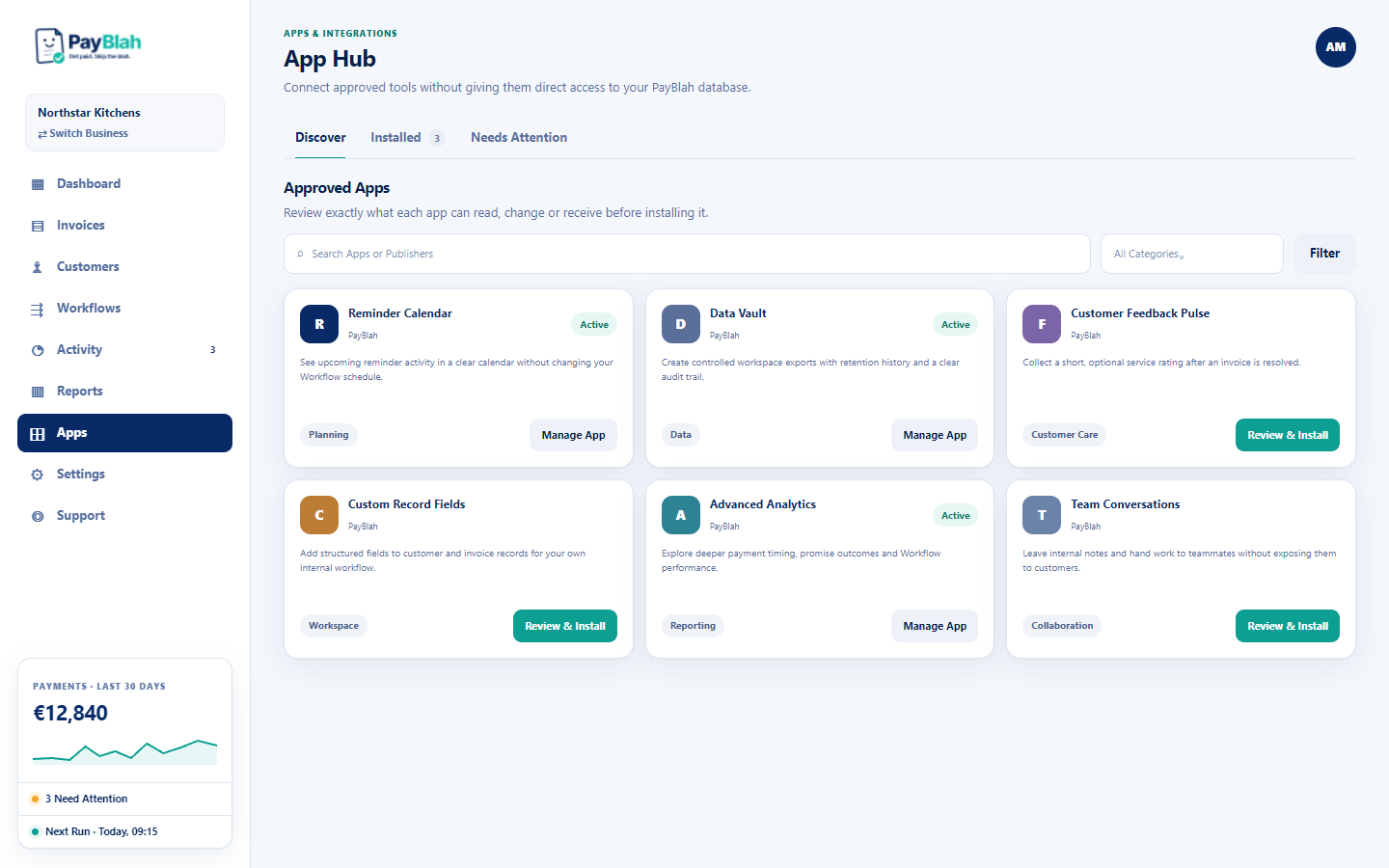
App Hub is an optional catalogue of published tools. It does not replace core chasing, billing, or accounting connections. The page lead is: Connect approved tools without giving them direct access to your PayBlah database.
Prerequisites
- You are signed in to a workspace.
- App Hub is switched on for that workspace. The Apps item in the left navigation and the Settings Apps pane are both hidden when it is off. That is the default for many estates — not every workspace sees Apps.
- If you open
/appswhile it is off, the page heading is App Hub Is Not Ready and the copy is: The App Hub is switched off. Existing PayBlah features continue normally and no app can run.
Open App Hub
- Sign in. If you see Apps in the main navigation, open it. The eyebrow is Apps & Integrations and the heading is App Hub.
- Or open Settings and, if the pane is present, choose Apps, then press Open App Hub.
- Use the tabs Discover, Installed, and Needs Attention.
What Discover shows
The Discover heading is Approved Apps. Search uses the placeholder Search Apps or Publishers, with Filter and Clear. Only published catalogue rows with a published version appear. Draft adapters are not listed, greyed, or offered as Connect.
Card actions you may see:
- Review & Install — a published native app that can be installed.
- Open App or Manage App — an installation already exists.
- Open {name} — a published pointer to an existing PayBlah screen (Connections, mailbox, API & webhooks, or Workflow Pack Library).
- View Details — inspect only, including when a workspace administrator is required.
- Coming soon: Live connect is not launch-ready for this provider yet. — a published provider pointer with no Open action.
Status badges on cards: Active, Paused, Finishing Setup, Removing, Access Revoked, Needs Attention.
Settings Apps pane
When App Hub is on, Settings includes an Apps pane (kicker Workspace App Hub) with a count of installed apps and Open App Hub. Pausing or removing an app does not delete invoices, customers, workflows, payments, or PayBlah settings.
If Portal Branding Plus is installed and running, a second kicker Installed Add-ons appears with Manage. That is this native app only. It is not a billing capacity pack.
Nine native installable apps
Only these nine are App Hub installs. Each has its own article.
- Reminder Calendar — Plan Requirement: Every Plan
- Realtime Alerts — Every Plan
- Data Cleanup Assistant — Every Plan
- Custom Record Fields — Every Plan
- Advanced Analytics — Every Plan (the App Hub install screen shows Every Plan)
- Customer Feedback Pulse — Every Plan
- Team Conversations — Growth or Higher
- Data Vault — Growth or Higher; Owner or Admin to use
- Portal Branding Plus — Pro or Higher
Workflow Pack Library, Zapier, Make.com, and n8n appear as published pointers. They are not App Hub install lifecycles. See Published apps vs draft connections.
Expected result
You see only published apps. You can open details. You cannot install unless you are an Admin, the hub and new installs are enabled, the app is published, and the workspace plan matches Plan Requirement.
If something is missing
- No Apps in the nav — App Hub is off for this workspace. Core PayBlah features continue. Ask an Owner if you expected Apps.
- App Hub Is Not Ready or Settings copy Apps are safely unavailable — same condition. PayBlah does not show sample apps.
- No Apps Match These Filters — clear search or category. Only live published entries appear.
- Workspace administrator required — a Standard member can view some pointers; an Admin must change them.
What this will not do
- App Hub does not make PayBlah a debt collector or hold customer funds. You remain the creditor.
- A published card is not proof of live OAuth, sync, or send. Coming soon still has no Open.
- Draft adapters are not tenant cards. There is no Connect path to follow for them.